Civicade

CivicAssets · Assets & work orders

Know what you own, what condition it's in and what's due next.

CivicAssets gives public works a shared inventory, inspection history and preventive maintenance schedule, and turns findings and service requests into trackable work orders.

  1. 1Build the inventoryImport a spreadsheet or add assets one by one, with type, location, condition and details.
  2. 2InspectRecord inspections; the asset's condition updates and follow-up work can be created in one step.
  3. 3Schedule maintenanceSet recurring schedules; work orders are created automatically a week before they're due.
  4. 4Complete the workCrews record costs, notes and hours; completing scheduled work moves the next due date.

In the current build

See CivicAssets at work.

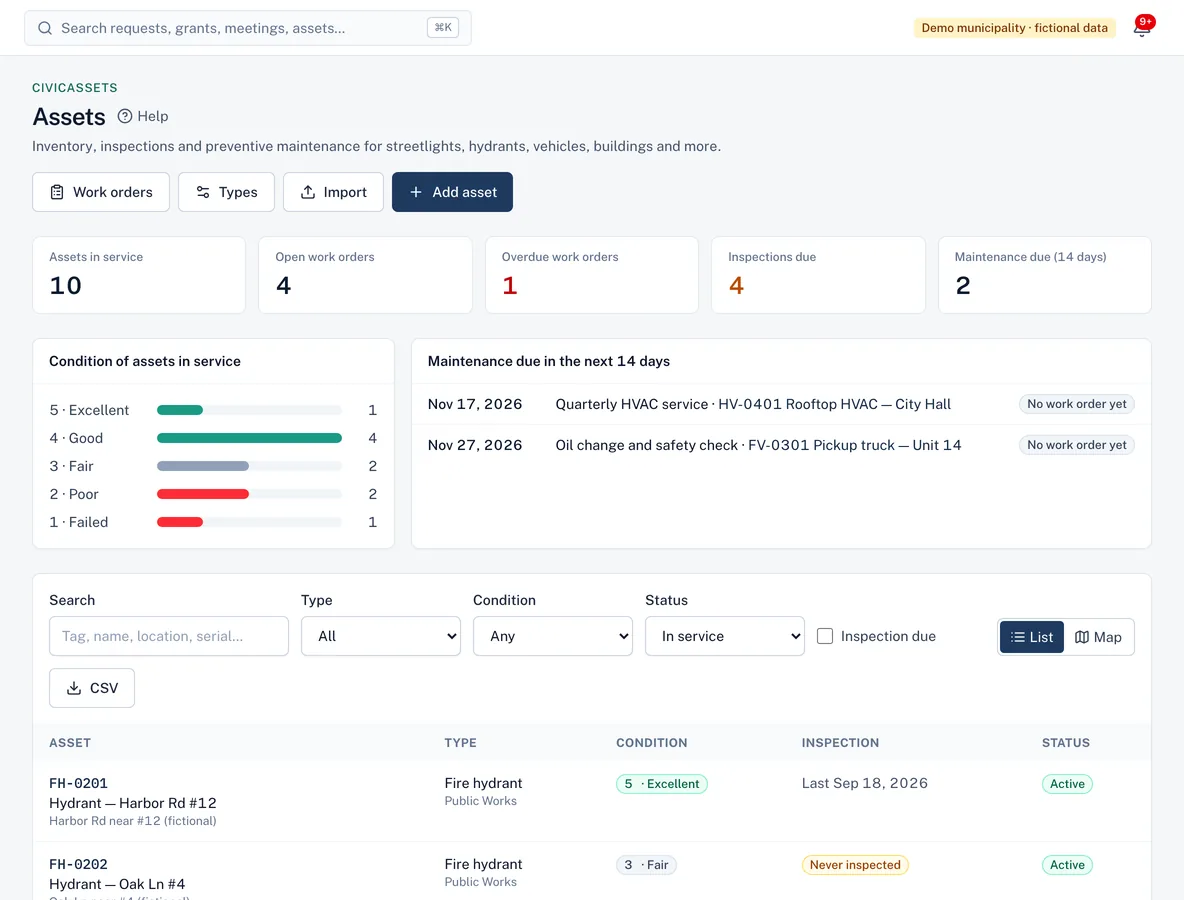
Assets dashboard with assets in service, open and overdue work orders, inspections due, asset condition breakdown and maintenance due in the next 14 days.
Condition, inspections and upcoming maintenance at a glance.
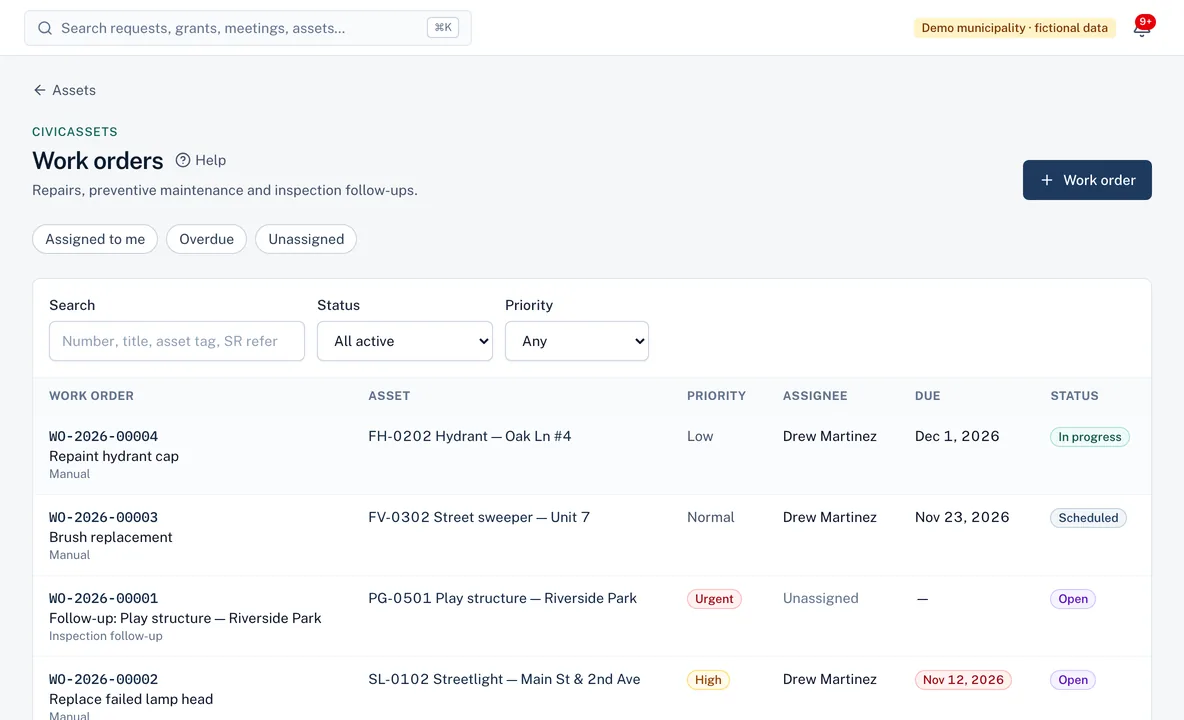
Work orders list with asset, priority, assignee, due date and status for each work order.
Work orders linked to assets, with priority, assignee and due date.

Screenshots from the current build, using a demo municipality with fictional data.

Capabilities

What CivicAssets does

CivicAssets is available in the current build and offered to pilot municipalities. It shares accounts, permissions, audit history and integrations with every Civicade module.

Asset inventory

Available in current build

One record per asset with its tag, type, department, location, condition (1–5), purchase details and serial numbers.

  • Spreadsheet import with a full check before anything is saved
  • Map view, with poor-condition assets highlighted
  • Photos and documents on each asset

Inspections

Available in current build

Each asset type can have an inspection interval. Overdue inspections are flagged, and an inspection can create a follow-up work order.

Preventive maintenance

Available in current build

Recurring schedules generate work orders automatically. Completing one moves the next due date forward.

Work orders

Available in current build

Priority, assignee, due date and status for every job. Assignees can update and complete their own work orders.

  • Completion notes required
  • Overdue work orders flagged and notified once
  • Linked service requests resolve automatically

Costs

Available in current build

Record labor, parts, equipment and contractor costs on each work order and see the lifetime maintenance spend per asset.

Dashboard and export

Available in current build

Open and overdue work, assets by condition, inspections due and upcoming maintenance, with CSV export.

Roles

Clear responsibilities for everyone involved.

Roles are bundles of specific permissions your administrator can adjust.

Public works manager

Maintains the inventory, schedules, inspections and work orders.

Field crew

Updates and completes assigned work orders, adding notes, hours, costs and photos.

Auditor

Read-only access to assets, inspections and work history.

Questions

CivicAssets FAQ

CivicAssets help articles
Is CivicAssets a GIS?
No. Assets can have coordinates and appear on a map, but CivicAssets doesn't manage GIS layers or replace your GIS. Use it for the work: inspections, maintenance and work orders.
Can we import our existing inventory?
Yes. Upload a CSV; every row is checked first and nothing is saved unless the whole file passes. The column guide is on the import page.
Does it track depreciation?
Not today. CivicAssets records purchase cost and maintenance spend, but it doesn't calculate depreciation.

Insights

Further reading

See whether CivicAssets fits your workflow

Walk us through how requests reach your office today. We'll show you the product, answer questions honestly—including what isn't built yet—and talk through what a pilot would involve.