Civicade

CivicGrants · Grant management

Find, win and manage grants without spreadsheets and sticky notes.

CivicGrants keeps every opportunity, application, award and reporting deadline in one shared place, so nothing is missed when staff change or deadlines pile up.

  1. 1Track opportunitiesRecord funders, programs, amounts, match requirements and deadlines as you find them.
  2. 2Prepare applicationsMove each application through draft and internal review to submission, with tasks and files.
  3. 3Record the awardEnter the award amount, period and award number from the funder's letter.
  4. 4Spend and reportTrack the budget, spending, reimbursement requests and every report the funder requires.

In the current build

See CivicGrants at work.

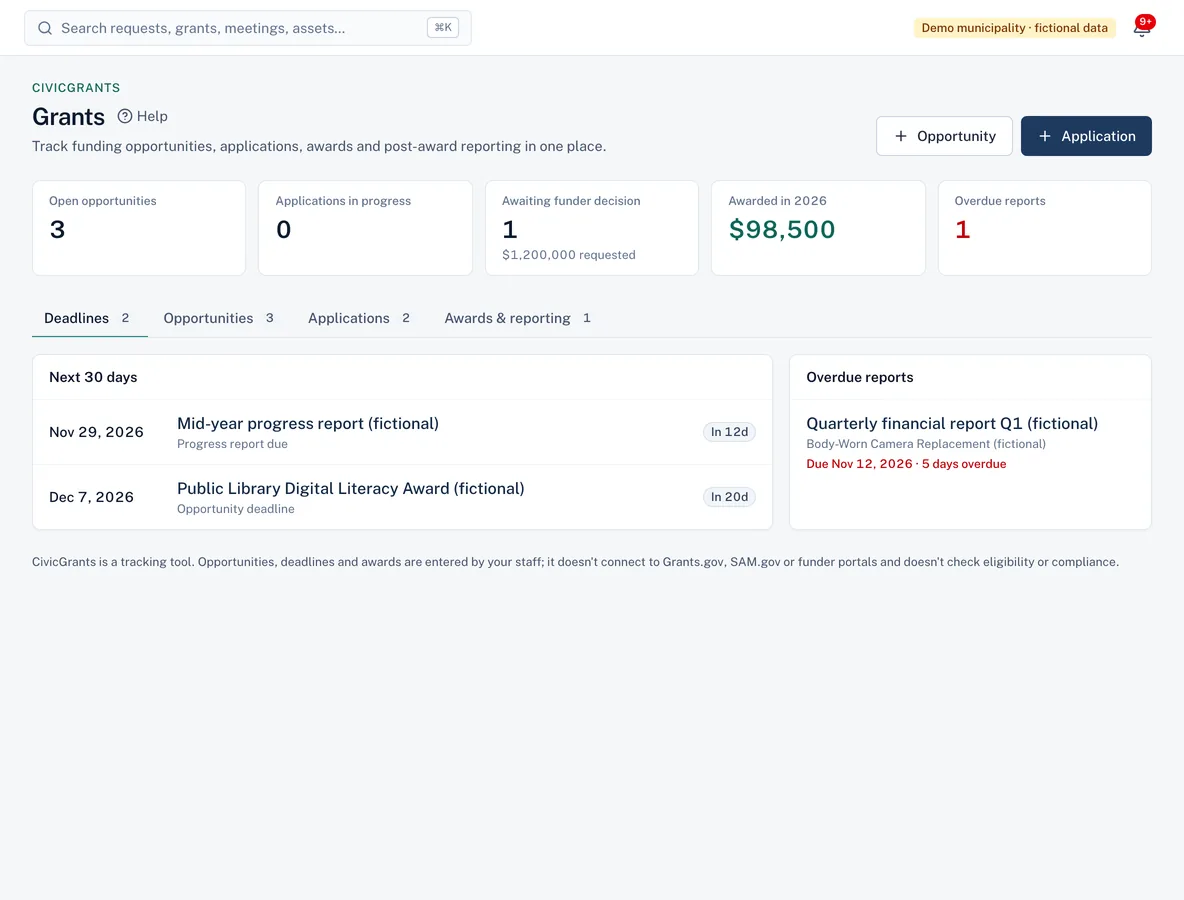
Grants dashboard with open opportunities, applications in progress, amount awarded this year, upcoming deadlines and an overdue report.
Deadlines, applications and awards in one place, with overdue reports called out.
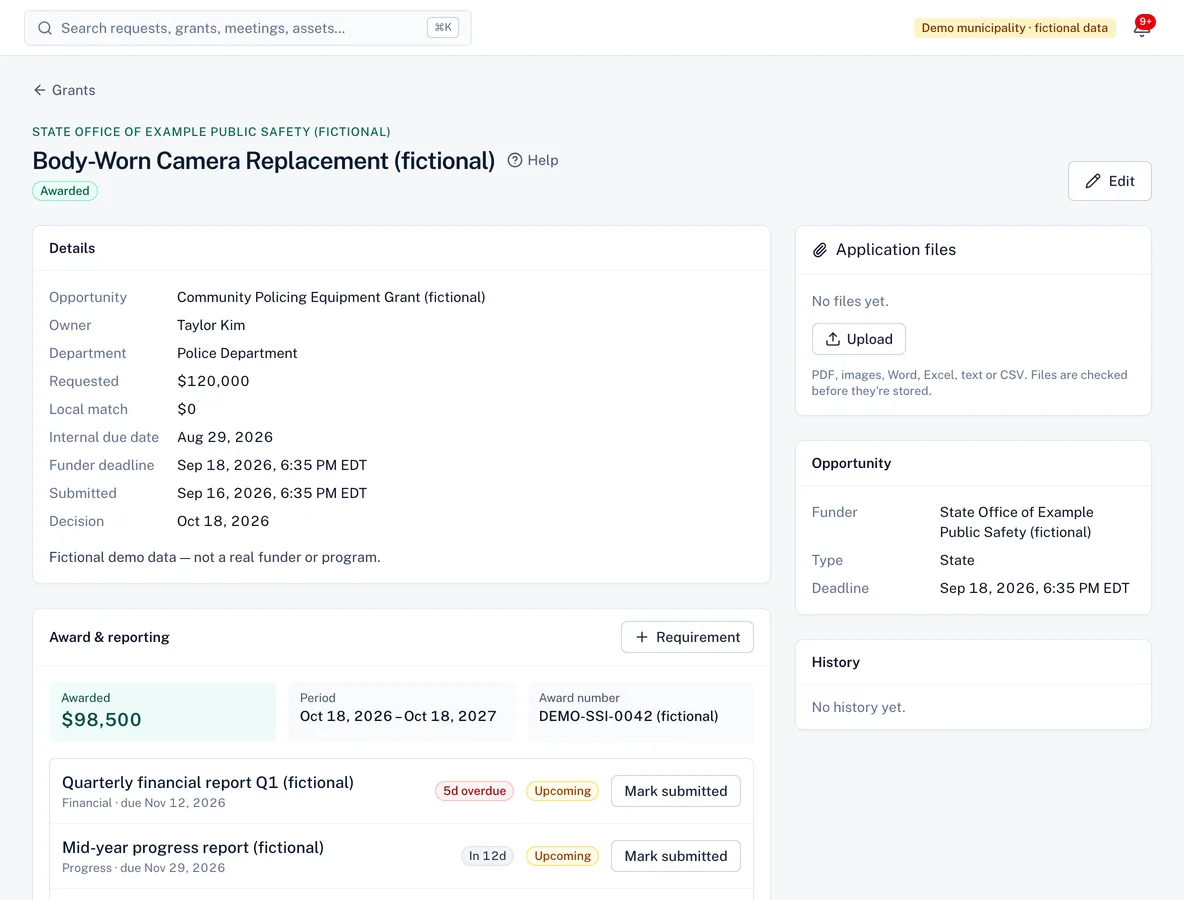
An awarded grant application showing details, the awarded amount and award period, and reporting requirements with due dates and status.
After the award: reporting requirements with due dates and status.

Screenshots from the current build, using a demo municipality with fictional data.

Capabilities

What CivicGrants does

CivicGrants is available in the current build and offered to pilot municipalities. It shares accounts, permissions, audit history and integrations with every Civicade module.

Opportunity pipeline

Available in current build

See what you're evaluating, pursuing or passing on, and which deadlines are coming up.

  • Federal, state, foundation and corporate funders
  • Amount ranges, local match notes and eligibility notes
  • Owner and department for every opportunity

Applications with a clear workflow

Available in current build

Draft, internal review, submitted, awarded or declined: each step is recorded, and you can't skip ahead.

  • Internal due dates and funder deadlines
  • Tasks with assignees and due dates
  • Application files kept with the application

Budgets, spending and reimbursements

Available in current build

Enter the approved budget, record expenditures against each line, and track reimbursement (drawdown) requests to the funder.

  • Spent, remaining and reimbursed at a glance
  • Over-budget lines and costs outside the award period are flagged
  • Expenditures can't be claimed twice
  • CSV export for your finance office

Reporting requirements

Available in current build

List every financial, progress and final report. Staff mark reports submitted; managers accept them.

  • Overdue reports highlighted
  • An award can't be closed while reports are outstanding

Deadline reminders

Available in current build

Owners are reminded 14, 7 and 1 day before submission deadlines and report due dates, and managers are told when a report becomes overdue.

History and audit trail

Available in current build

Every status change, award, report and expenditure is recorded with who did it and when.

Roles

Clear responsibilities for everyone involved.

Roles are bundles of specific permissions your administrator can adjust.

Grants manager

Adds opportunities, runs applications, records awards, sets budgets and approves reimbursement requests.

Grant contributor

Department staff who record expenditures and mark reports submitted for the grants they work on.

Auditor

Read-only access to every grant, award and expenditure, with the full history.

Questions

CivicGrants FAQ

CivicGrants help articles
Does CivicGrants find grants for us or sync with Grants.gov?
No. Staff enter the opportunities they find. CivicGrants doesn't connect to Grants.gov, SAM.gov or funder portals, and it doesn't check eligibility. It keeps what you find organised and on schedule.
Is CivicGrants an accounting system?
No. It records the budget, expenditures and reimbursements staff enter so you can see where each grant stands. Your financial system remains the official ledger; CSV export makes reconciling easier.
Who gets deadline reminders?
The application owner gets reminders 14, 7 and 1 day before a submission deadline or report due date. When a report becomes overdue, the owner and grants managers are notified.

Insights

Further reading

See whether CivicGrants fits your workflow

Walk us through how requests reach your office today. We'll show you the product, answer questions honestly—including what isn't built yet—and talk through what a pilot would involve.