Civicade

CivicRecords · Public records request management

Every request, deadline and release—in one trackable workflow.

CivicRecords helps municipal staff receive, route, review and fulfill public records requests (often called FOIA requests). Staff stay in control of every decision; the software keeps the work organised, on time and recorded.

Illustrative interface with fictional requests.

The request lifecycle

From submission to response, nothing falls between inboxes.

Each request follows a clear path with an owner, a status and a deadline. Steps that need judgement—like legal review—can't be skipped.

  1. 1

    Submission

    A resident submits through your portal, or staff log a request that arrived by email, phone or counter.

  2. 2

    Intake

    The request is acknowledged, categorised and given a deadline your rules define.

  3. 3

    Assignment

    An owner is set and departments get clear tasks to search for records.

  4. 4

    Document review

    Records are collected in one place, checked, searched and marked responsive.

  5. 5

    Redaction review

    Staff redact and counsel approves. Suggestions never apply themselves.

  6. 6

    Response

    Approved records are released through a private link, with a full history.

The public records request lifecycle in CivicRecords. People make every disclosure decision; the software keeps the work organised and recorded.

In the current build

See CivicRecords at work.

From the public portal and released-records archive to redaction review: the screens your staff and residents would use.

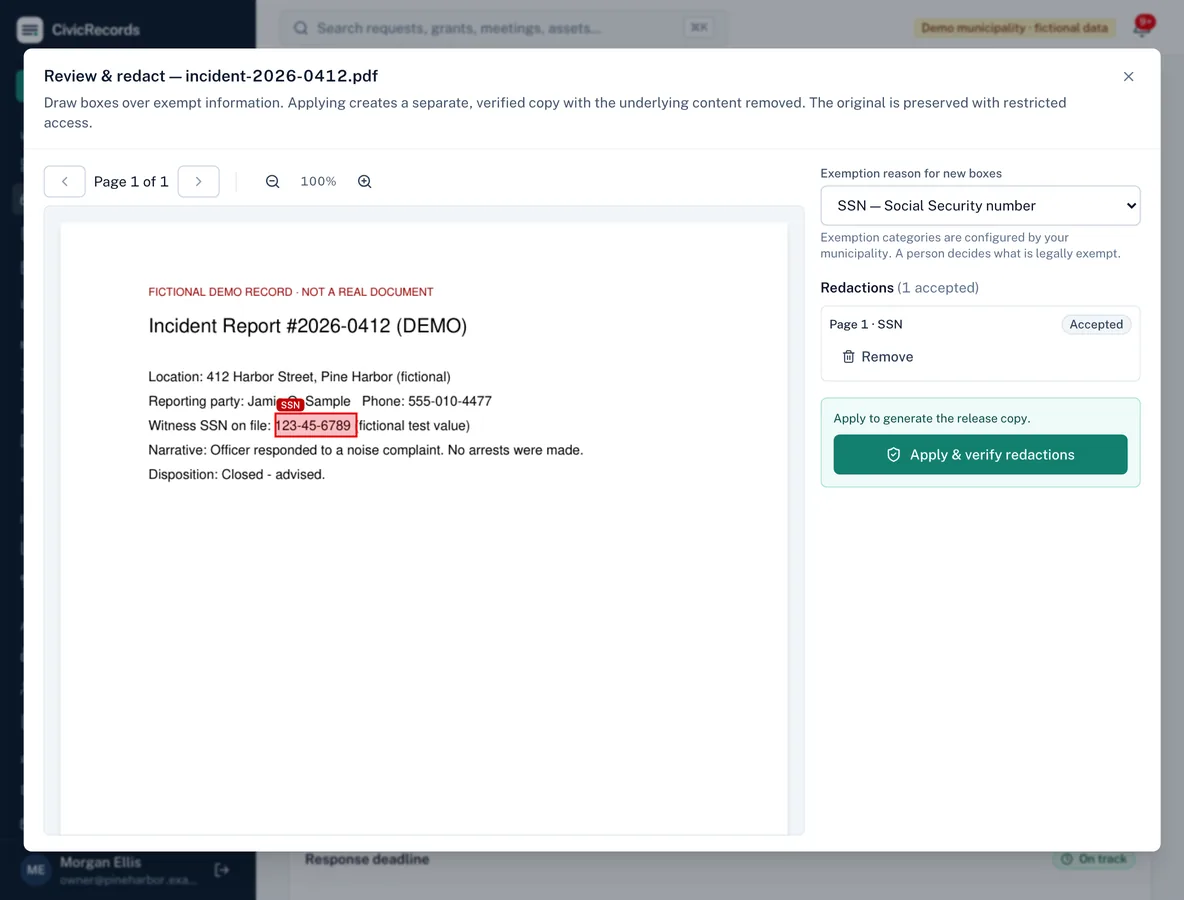
Review and redact dialog: a box drawn over a Social Security number on a demo incident report, labelled SSN, with the redaction listed as accepted and an Apply and verify redactions button.
Redaction review: mark exempt text with a reason; applying creates a verified copy and keeps the original restricted.
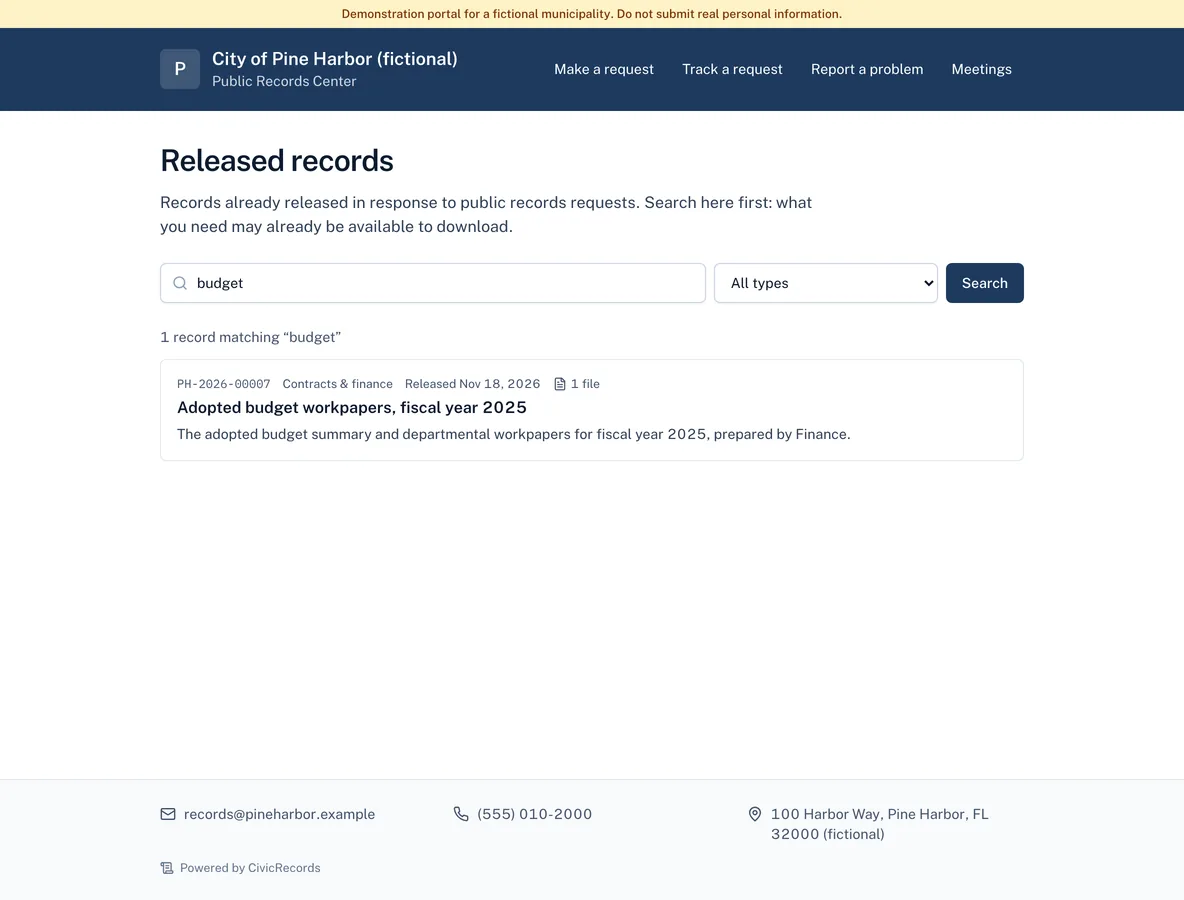
Public released-records archive on a demo town's portal: a search for budget returns the adopted budget workpapers with reference number, category, release date and file count.
Released records residents can search before filing a new request.
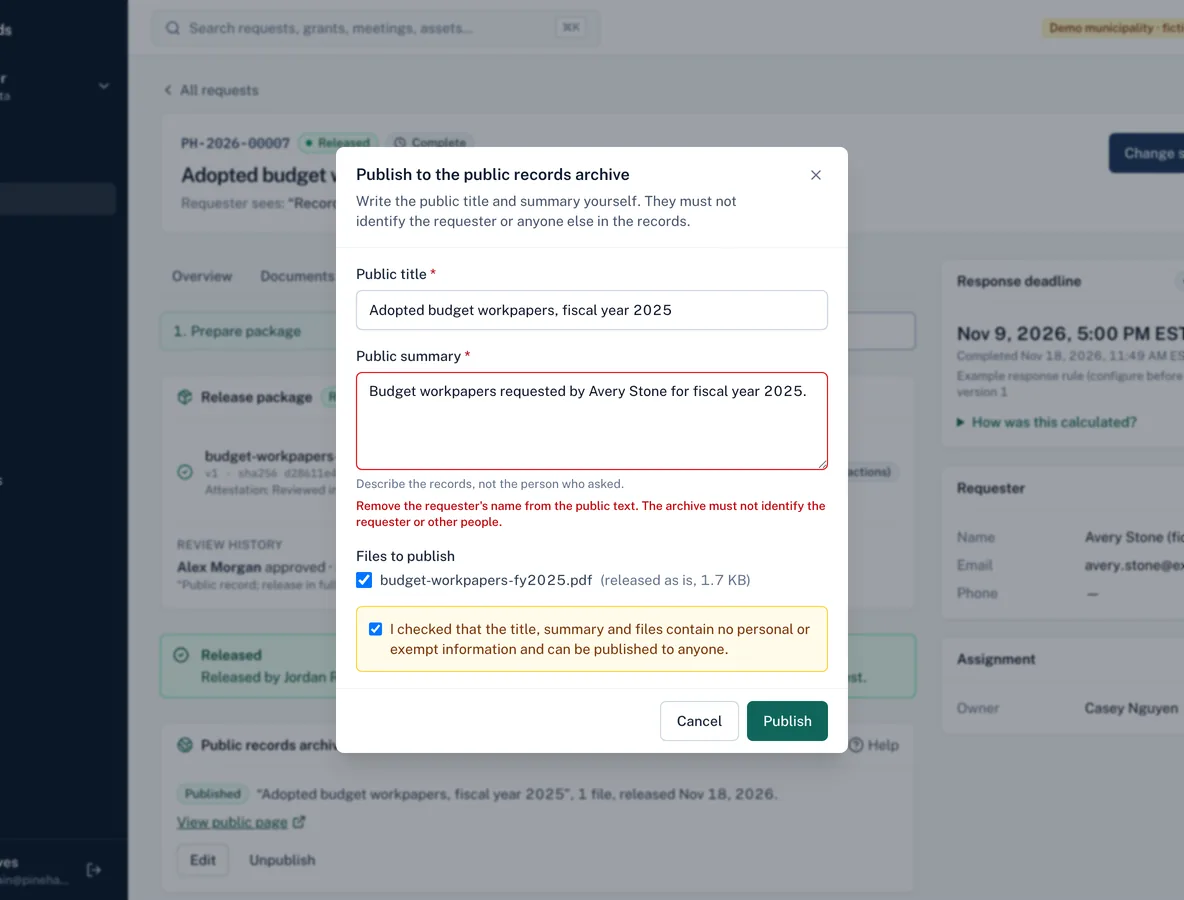
Publish to the public records archive dialog: the summary names the requester, and the form refuses it with the message to remove the requester's name.
Publishing to the archive: staff write the public text, and it can't name the requester.
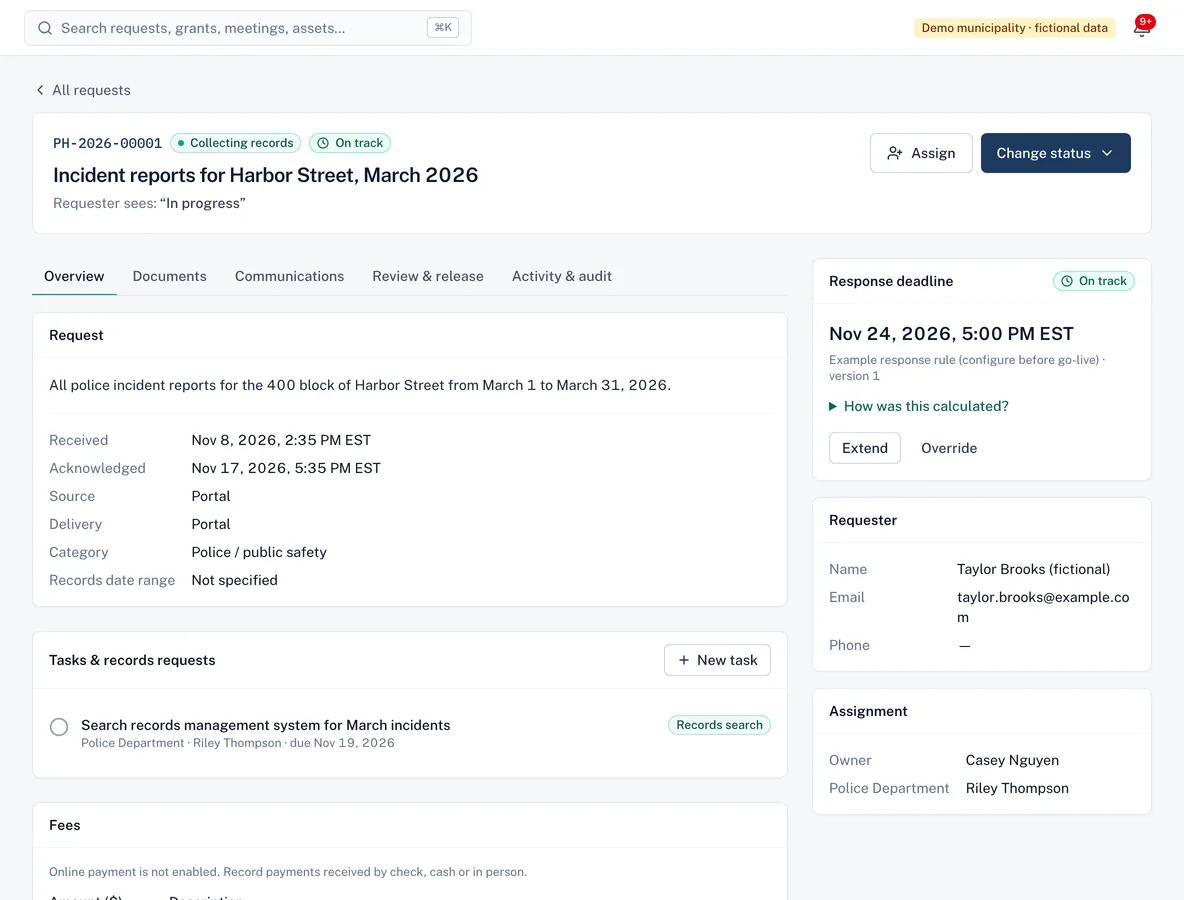
A records request page showing the request details, requester, assignment, a task for the police department and the response deadline with a link explaining how it was calculated.
Every request has an owner, tasks for departments and a deadline you can explain.
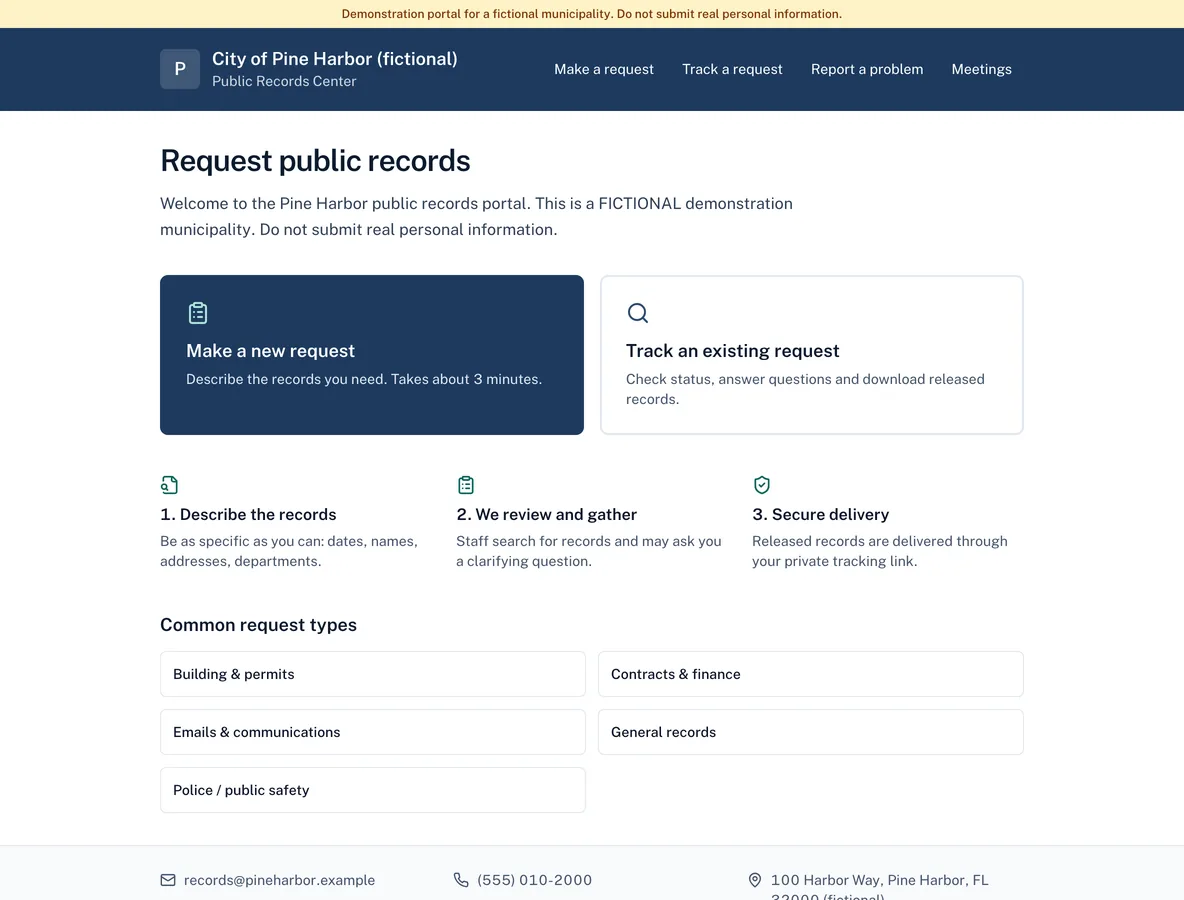
Public records portal for a fictional town with options to make a new request or track an existing one, and common request types.
The public portal residents use to submit and track requests.

Screenshots from the current build, using a demo municipality with fictional data.

Capabilities

What CivicRecords does today—and what's next.

Labels show what's available in the current product build (which we're preparing to pilot) versus what's planned.

Request intake & public portal

Available in current build
Residents submit requests on a portal with your municipality's name and instructions. Every request is acknowledged with a reference number.
  • Branded, mobile-friendly submission form
  • Reference number and private tracking link
  • Staff can log requests received by email, phone, mail or in person
  • Requesters reply to questions and download records through their link

Assignment, routing & collaboration

Available in current build
Route requests to the departments that hold the records. Department staff see exactly what's needed and upload files directly.
  • One accountable owner per request
  • Department tasks with due dates
  • Internal notes kept separate from requester messages
  • Category-based routing to a default department

Deadline tracking & reminders

Available in current build
Your municipality configures its rules; CivicRecords applies them consistently and keeps the rule version each request used.
  • Business-day or calendar-day rules, holidays and closures
  • Pauses and extensions only where your rules allow
  • Reminders before due dates and alerts when overdue
  • A plain-language explanation of every due date

Document collection & organisation

Available in current build
Collect records from departments in one place instead of shared-drive folders and email attachments.
  • Files checked by content, not just extension
  • Malware-scanning integration point and quarantine
  • Originals stored privately with restricted access
  • Classify records as responsive, non-responsive or withheld

Released-records archive

Available in current build
Records you've already released become a searchable page on your portal, so the next resident can find them without filing a new request. Requests on legal hold can't be published, and unpublishing takes effect immediately. How publishing works.
  • Staff publish a released request with their own public title and summary
  • Only the files the requester received are published, never originals
  • Public text naming the requester or containing contact details is refused
  • Residents search before asking, and the request form suggests matches as they type

Email archive import

Available in current build
Email-heavy requests start with an export from the mail system. Import it in one step instead of saving messages one by one. How to import an archive.
  • .eml and .mbox files, and Outlook .pst on servers with the readpst tool (included in our server image)
  • One PDF per email, with headers and body
  • Attachments uploaded as linked documents, checked like any upload
  • Duplicates skipped within an archive and across imports

Duplicate detection & reusable responses

Planned
Today, CivicRecords flags duplicate files within a request and provides reusable message templates for acknowledgments, clarifications and releases. Detecting duplicate or related requests is planned.

AI-assisted redaction suggestions, with human approval

Available in current build
Suggestions can highlight possible personal information such as phone numbers or account numbers. They are a starting point for review—never a decision. Why human review must stay in control.
  • Optional and off by default; your municipality decides
  • Suggestions must be accepted and given a legal reason by a person
  • Redaction removes content, then the copy is checked automatically
  • Legal review approves the release package

Audit trails & activity history

Available in current build
Status changes, assignments, uploads, downloads, redactions, approvals and releases are recorded with who, what and when. The audit log is append-only: entries can't be edited or deleted.

Notifications & integrations

Available in current build
Keep people informed without putting confidential details in an inbox.
  • In-app and email notifications for assignments, deadlines and replies
  • Emails link to the secure app instead of containing sensitive content
  • Webhooks, an API and spreadsheet import
  • Microsoft 365, SharePoint, OneDrive and Google Drive file collection with your own accounts

Reporting & operational visibility

Available in current build
A dashboard of open, due-soon and overdue requests, workload by owner and department, time to close and on-time rates—with each metric defined. Export to CSV for council reports.

Example roles

Clear responsibilities for everyone involved.

Roles are bundles of specific permissions your administrator can adjust.

Records coordinator

Receives and acknowledges requests, assigns owners and departments, communicates with requesters, prepares redactions and release packages.

Department reviewer

Sees only requests assigned to their department, searches for records, uploads files and notes context—without access to requester contact details unless granted.

Administrator

Manages users, roles, departments, deadline rules, templates and settings. Every change is recorded in the audit log.

Legal reviewers, auditors (read-only) and department managers have their own roles too.

Implementation & onboarding

Set up around your office—not the other way round.

We help configure departments, roles, categories, templates and deadline rules, import open requests from a spreadsheet, and train each group of users. Your counsel validates the legal rules; we make sure the system applies them.

A note on laws and terminology

Public records laws differ from state to state—in what they cover, how quickly agencies must respond, what may be withheld and what fees are allowed. Terminology varies too. CivicRecords provides configurable workflows that can help staff manage requests and deadlines; it does not provide legal advice or guarantee compliance with any law. Your municipality remains responsible for its legal obligations and policies, and should rely on its own counsel and official state guidance.

Questions

CivicRecords FAQ

What's the difference between a public records request and a FOIA request?
The federal Freedom of Information Act (FOIA) applies to federal agencies. Cities and towns operate under their own state's public records law, which may be called a public records act, open records law, right-to-know law or sunshine law. People often say “FOIA request” for both. CivicRecords supports the shared workflow—intake, deadlines, search, review and release—while each municipality configures the rules that apply to it.
Does CivicRecords know my state's deadlines?
No, and we don't pretend to. Response periods, business-day rules, extensions and pauses vary by state and sometimes by request type. Your municipality configures its rules (with its counsel) and CivicRecords applies them consistently, keeps a version history, and shows staff how each due date was calculated.
Does AI decide what gets redacted?
No. AI assistance is optional and off unless your municipality turns it on. When enabled, it can suggest possible personal information to review. A staff member must accept each suggestion and choose the legal reason; nothing is applied, withheld or released automatically.
Is a redaction really permanent?
CivicRecords creates a separate redacted copy in which the underlying text and image content in each marked area is removed, then checks the copy automatically before it can be released. The original is kept with restricted access. Formats we can't safely redact (such as Word files) are blocked from automated redaction and need a manual process.
Can residents track their requests?
Yes. Each requester gets a private link to see plain-language status, answer clarification questions and download released records. Requests themselves aren't public.
Can residents see records you've already released?
Only if you publish them. Staff can publish a released request to a searchable archive on your portal, with a public title and summary they write and only the released files. The requester's name and contact details are never shown, and you can unpublish at any time.
Do we have to replace our existing systems?
No. CivicRecords focuses on the request workflow and can sit alongside your document repositories and email. It offers webhooks, an API, spreadsheet import, file collection from Microsoft 365, SharePoint and Google Drive, email intake and online fee payments (each using your own accounts). See how the platform coexists with existing systems.

More answers on the FAQ page.

See CivicRecords with your own workflow in mind

Walk us through how requests reach your office today. We'll show you the product, answer questions honestly—including what isn't built yet—and talk through what a pilot would involve.