Civicade

CivicClerk · Agendas & meetings

From department proposal to approved minutes, in one place.

CivicClerk helps clerks collect agenda items from departments, publish agendas, record what happened at the meeting and approve minutes, while residents follow along on a public meetings page.

  1. 1Collect itemsDepartments propose items for a draft meeting. The clerk approves, reorders or withdraws them.
  2. 2Publish the agendaPublishing puts the agenda, packet files and livestream link on the public meetings page.
  3. 3Record the meetingTake roll call, record each member's vote and the outcome of every item.
  4. 4Approve minutesDraft minutes, approve them, and they appear publicly. Approved minutes are locked.

In the current build

See CivicClerk at work.

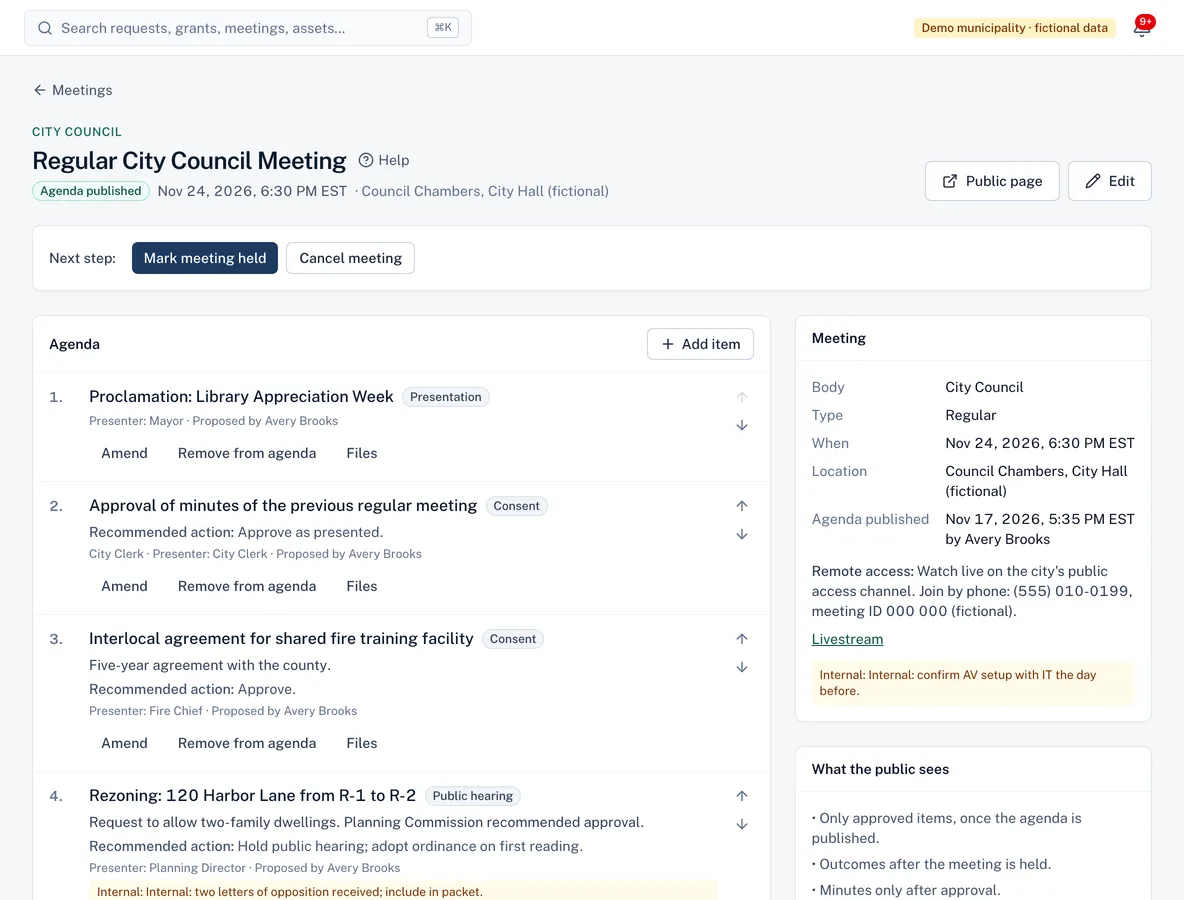
Meeting page for a city council meeting with numbered agenda items, item types such as consent and public hearing, recommended actions and meeting details.
Build the agenda item by item; internal notes stay internal.
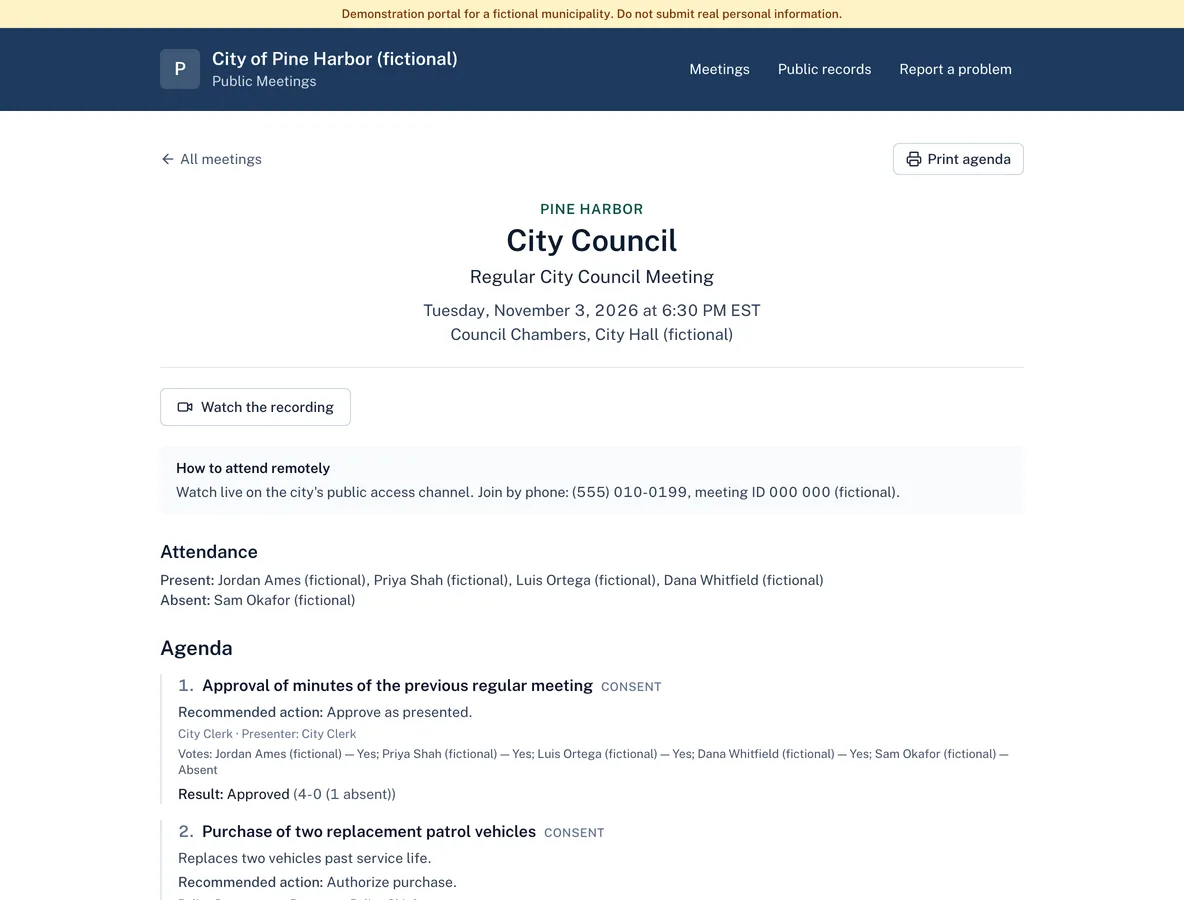
Public meeting page with attendance, agenda items, recorded votes by member and results.
The public meeting page with attendance, votes and outcomes.

Screenshots from the current build, using a demo municipality with fictional data.

Capabilities

What CivicClerk does

CivicClerk is available in the current build and offered to pilot municipalities. It shares accounts, permissions, audit history and integrations with every Civicade module.

Agenda builder

Available in current build

Department staff propose items; the clerk approves, reorders (with keyboard-friendly controls) and withdraws them.

  • Consent, public hearing, action, discussion and report items
  • Recommended actions and presenters
  • Internal notes that never appear publicly

Publishing and amendments

Available in current build

An agenda can't be published until at least one item is approved. Changes after publishing are recorded as amendments with a required reason.

Agenda packet files

Available in current build

Attach staff reports and supporting documents to items. Files marked public appear on the public agenda once it's published.

Roll call, votes and outcomes

Available in current build

Record who attended and how each member voted on each item. The tally is calculated for you.

  • Yes, no, abstain, recused and absent
  • Outcomes: approved, denied, tabled, continued, no action
  • Votes can be corrected until minutes are approved

Minutes approval

Available in current build

Draft minutes stay internal. Once approved they are published and locked.

Bodies and members

Available in current build

Set up your council, boards and commissions with members, seats and terms.

For residents

A public meetings page residents can actually use.

Each municipality gets a public meetings page with upcoming and past meetings, printable agendas and approved minutes.

  • Livestream link before the meeting, recording link after
  • Attendance and how each member voted
  • Packet documents to download
  • Never shows drafts, proposals, internal notes or who proposed an item

Roles

Clear responsibilities for everyone involved.

Roles are bundles of specific permissions your administrator can adjust.

City clerk

Schedules meetings, approves and publishes agendas, records votes and approves minutes.

Agenda contributor

Department staff who propose agenda items for upcoming meetings.

Auditor

Read-only access to meetings, agendas and minutes, with the history of every change.

Questions

CivicClerk FAQ

CivicClerk help articles
Does CivicClerk handle open meetings law notice requirements?
CivicClerk records when each agenda was published and keeps amendments with reasons, which helps you show what was posted and when. It doesn't know your state's notice rules; your clerk and counsel remain responsible for meeting them.
Can we stream meetings from CivicClerk?
No. Add your existing livestream and recording links to each meeting and they appear on the public page. CivicClerk doesn't host video.
Can department staff see internal notes?
Internal notes are visible to staff with access to meetings, never to the public. Department contributors can edit only their own proposed items.

Insights

Further reading

See whether CivicClerk fits your workflow

Walk us through how requests reach your office today. We'll show you the product, answer questions honestly—including what isn't built yet—and talk through what a pilot would involve.